Horse Statue
Simple Horse Statue
We start with the free Millineum Horse from DAZ Millineum Horse
I see it says $6.95, but at the top of the initial page it says free for platinum club members or with any purchase.
If you are on a tight budget, like me, the Platinum Club is an essential. Since I don't know much about what I am doing, the really big models often overwhelm. The PC has thousands of models, hair, poses, ... for $2 or $3. I think it is essential. Most of the models, and modifiers, I have come from these items. You could say that I now have piles of the wrong stuff, and that is true, but I am learning for $2 each instead of $40 each. Many of the expensive items are a major boost to good work, but many also don't fit my goals. You may benefit from the same approach.
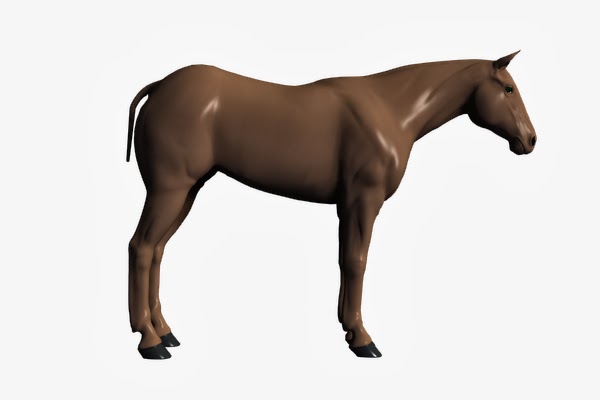
Load the horse. It will be under poser format->( your library name )->figures->DAZ Animals
default horse
This model has an amazing number of parameters.
Be sure to click All to see them. They are not grouped under a heading, so if you click general, etc. You won't see them.
First you can choose from a number of breeds.( To use the breeds set one of them to 1.0 and the rest to 0.0 unless you want to create your own blend.)
Thoroughbred
Arabian
Donkey
Shetland
Let's go with
Mustang
There are some problems with the tail and mane. There are a lot of tail parameters, but the didn't seem to work. To get the tail first we have to go to surfaces and up its opacity.
Wow, that's a lot of tail.
There is a tail length parameter. -0.50 looked right.
The mane is a little more complex. There are three manes ManeLeft, ManeRight, and ManeUp. Setting opacity to 100% percent didn't do anything for ManeRight, or ManeUp. ManeLeft was huge and confusing. There are "Gone" parameters for the Manes. I went with ManeLGone at 0.0 and the others at 1.0 which gave me a mane on the left. Not great, but visible. Let's fine tune the tail and mane after we get a pose.
look in poses->DAZ's Mil Horse
I like Walk for a statue.
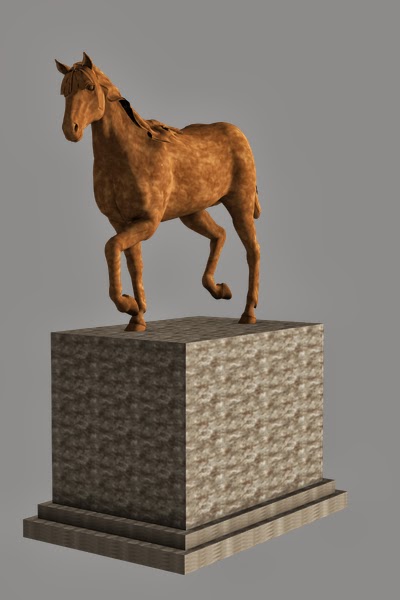
After tweaking the mane and tail, here is where I wound up.
Some tips. Unless you want a draft horse you want the fetlocks gone and invisible. I couldn't find a setting I liked for the forelocks, so I made them gone and invisible as well.
Now for a base. Create a cube I made it 3 m with 10 divisions.
Working from the left and top views scale and translate until you have a good base
Rename the cube to base and group with the horse into a group called ceramicHorseStatue. Scale that group 10% and save as a scene subset. This is now a table top size (20 cm about 8" tall) statue.
Control-Z to remove the scale change.
Create another cube like before. Click on the first cube we renamed base then press Control-C to copy settings. Click on the new cube2 and press Control-V to transfer settings. Using the top view align this new base exactly like the first one. Then scale 110% switch view and Y translate it down until it is almost completely below the base, but still has a small overlap. Rename it to step1
Repeat this and make a step2. Y scale the base until it is now 70% instead of about 6%. Y translate the horse until it is on top of this new structure.
The best way to change the textures now is with a stone shader.
Here is a free set at sharecg.com free stone shaders
For $2 we can get much better results with
Read More
More DM Freebies
The 3D artist team DM offers another excellent free model they call the Stair Wall
Available at
Stairwall
If we start with Fiery Genesis like we have before and then add the Stairwall, we can see chances for some good scenes right away


Lets add in another Stairwall and Y rotate 90 and align them so that we have a corner and the possibilities go way up.
This set is good for dramatic lighting as well.
When a piece is a high quality stand alone, often it is also an excellent high quality component of a larger construction.
Here I combined several Stairwalls with a Chapel (see Freebie Friday 3) to make a set as complex and rewarding as some expensive props.
Here is a list of the contents of my "Castle"
Because the pieces are so compelling the combination has many view points for your dramatic scenes or stories
By turning strategically placed elements the set can have many more rooms/scenes than a simple building alone.
<< r15 >> << r16 >>
Although this isn't technically a freebie, I want to alert you to an chance at a great bargain. Recently, at a Friends of the Library sale, I picked up a copy of Les Pardew's book about DAZ Studio for $2.00. It has a DVD containing V3/M3 A3/H3 A4/H4 V4.2/M4.2 and a few clothes and props. This is the first edition and although the text is solid it is somewhat out of date. There is a second edition which is a better book, but does not contain any models. So, if you shop for used books, you might just get very lucky.
Read More
3D Art Journey
I am beginning a 3D Art Journey.
I have admired 3D art work for a long time, but have not felt the tools available for a low cost would reward serious effort until now.
I have become convinced that artists can do good work using DAZ3D Studio, which is free (at this time). You can find it at DAZ 3D Studio Even though it is free, it will be necessary to spend some money on models, plug-ins, etc. as time goes by. But, unlike more powerful software with large up front costs, one can keep the expense under control.
I have had some experience with 3D software, on the other side of the screen, so to speak. I have worked on CAD systems and game engines in the past and I am a professional artist. However, I have not been much of a user of 3D software before and am seriously out of date as well. So I have just about everything to learn.
You should know that my computer is old and slow and wimpy, wimpy, wimpy. I will spend some time on how to cope with limited resources, escape crashes, and get more done.
My budget is very limited as well, so I will share information on available freebies and low budget goodies.
I invite you to join me in my journey as I learn to use the tools and develop an aesthetic. Beginners can learn along with me and advice from more experienced artists will be most welcome.
Read More






3_5.jpg)